PREPARE AN APPLICATION / MABASA GUIDES
How to tailor your CV to a job without inventing experience
Compare a job’s requirements with real career evidence, identify gaps and review optional AI suggestions before downloading a tailored CV.
THE SHORT ANSWER
Read the original job requirements, map each one to evidence from your experience, and emphasise the relevant facts in your CV. Use accurate terminology, not keyword stuffing. Mabasa’s optional paid AI tools can help compare requirements and draft wording, but you must verify the output; a fit score is not a hiring prediction.
Separate essential requirements from preferences
Start with the full original advert rather than a short feed summary. Identify the actual responsibilities, essential qualifications and preferred skills. A preferred tool should not automatically be treated as a mandatory qualification, and a broad title does not tell you everything the employer expects.
Create a short requirement-to-evidence list. For each important requirement, write down a real role, task, project or qualification that supports it. If you cannot find evidence, mark it as a gap instead of making the wording sound as if you have done it.
Make relevant experience easier to see
Adjust the summary and work-experience bullets so the reader can quickly find the evidence that matters for this role. Use the employer’s terminology when it accurately describes your experience. Do not copy the whole advert or hide repeated keywords in the document.
The National Careers Service recommends tailoring a CV to the job and checking that it remains clear and current. You can do this manually in Mabasa’s free CV Studio; a paid subscription is not necessary to write a focused application.
- Every skill on the CV is something you can discuss honestly.
- Dates, qualifications and job titles agree with your records.
- Results and numbers come from evidence you actually have.
- The most relevant tasks are easy to find.
- The file follows the employer’s requested format.
Use paid AI assistance when you want another review
Paid Mabasa memberships add career-profile-based job matching, CV/job-fit analysis and tailored resume assistance. In the matching workspace, review the saved role, the requirement details and the career evidence before choosing the resume-tailoring action.
AI-generated wording can improve clarity, but it can also misinterpret your profile or introduce errors. Review every proposed change, especially responsibilities, qualifications, dates and numerical claims. If the analysis says evidence is missing, check your profile; an omitted fact and a qualification you do not have are different problems.
- Check that the saved career profile is accurate and complete.
- Open a matched role and compare the requirements with your evidence.
- Use the resume-tailoring workflow if your membership permits it.
- Review and edit generated wording before keeping or downloading it.
- Check the final file against the original advert and your own records.
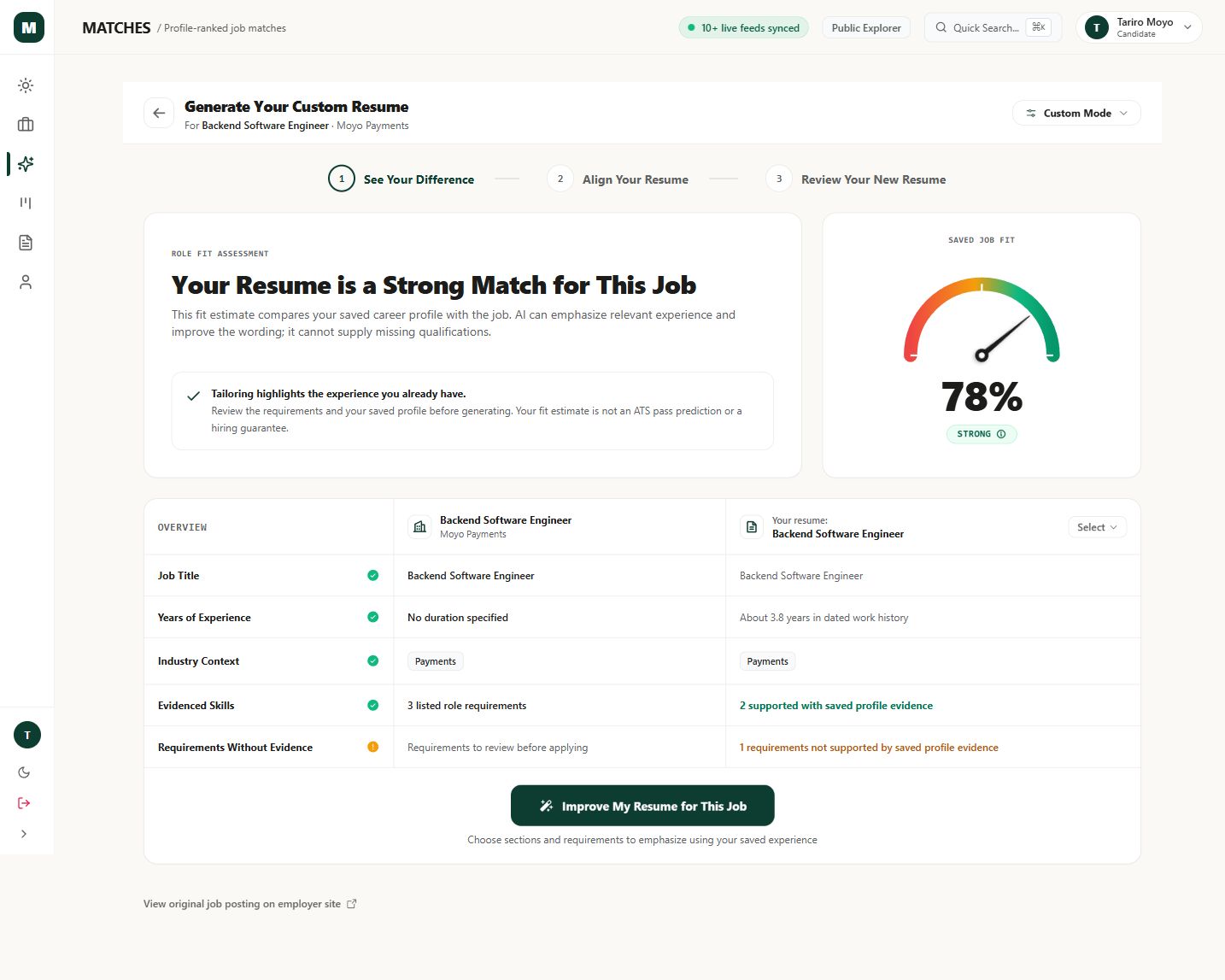
Treat fit scores as guidance, not a pass mark
A job-fit percentage is an estimate based on the available profile and job information. It is not the employer’s applicant-tracking-system score, an interview probability or a promise that you meet every requirement. Missing context or an incomplete advert can change how useful the assessment is.
A higher score is not a reason to invent a qualification or ignore location restrictions. A lower score can be a prompt to investigate a gap, correct an omitted fact or choose a different role. The employer makes the hiring decision, and you remain responsible for the application.
Save a version you can explain in an interview
Open the final PDF and read it as if each bullet were an interview question. If you could not explain how you did the work, revise the claim. Keep a copy with a clear role-specific filename so you know what the employer received.
Record the application in your tracker and keep the confirmation. You submit through the original employer or publisher; Mabasa does not automatically apply for you. Paid generation allowances vary by membership, so check current pricing and checkout limits before purchasing. The free manual tools remain available if you do not need AI.
Sources & product details
- National Careers Service: How to write a CV ↗
General guidance on tailoring, clarity and accurate CV sections.
- Mabasa memberships and limits ↗
Current monthly and annual prices and AI generation allowances.
- Mabasa privacy policy ↗
How submitted career information is processed.
Product instructions reflect the implementation reviewed on 22 October 2026. Example screenshots may differ from your device or a later release. This guide is prepared by Mabasa; external sources do not endorse the product.