BUILD YOUR CV / MABASA GUIDES
How to build and download a CV with Mabasa
Create a CV using free templates, replace sample details, check your mobile preview and download an A4 PDF from Mabasa CV Studio.
THE SHORT ANSWER
Open CV Studio, enter your own details, choose a free template, review the preview and select Download Resume to generate a PDF. No account is needed for the public builder. Free generation is limited to three per day, and PDF export temporarily processes your CV content on the server.
Gather the facts before choosing a template
Have your contact details, work history, education and relevant skills ready. If you are early in your career, use genuine projects, placements or volunteering to show what you have done. A clear account of real experience is more useful than filling every available field.
The UK National Careers Service recommends a clear, readable CV tailored to the opportunity. That is general writing guidance, not a rule for every Zimbabwean employer. Follow the specific advert’s requested format and supporting documents, including any requirement for a different file type.
- A name, phone number and email you check regularly.
- Job titles, organisations and accurate employment dates.
- Qualifications and institutions, with completion dates where relevant.
- Specific examples of tasks, projects or results you can explain.
- The original job advert, so you can decide what to emphasise.
Replace every sample detail with your own
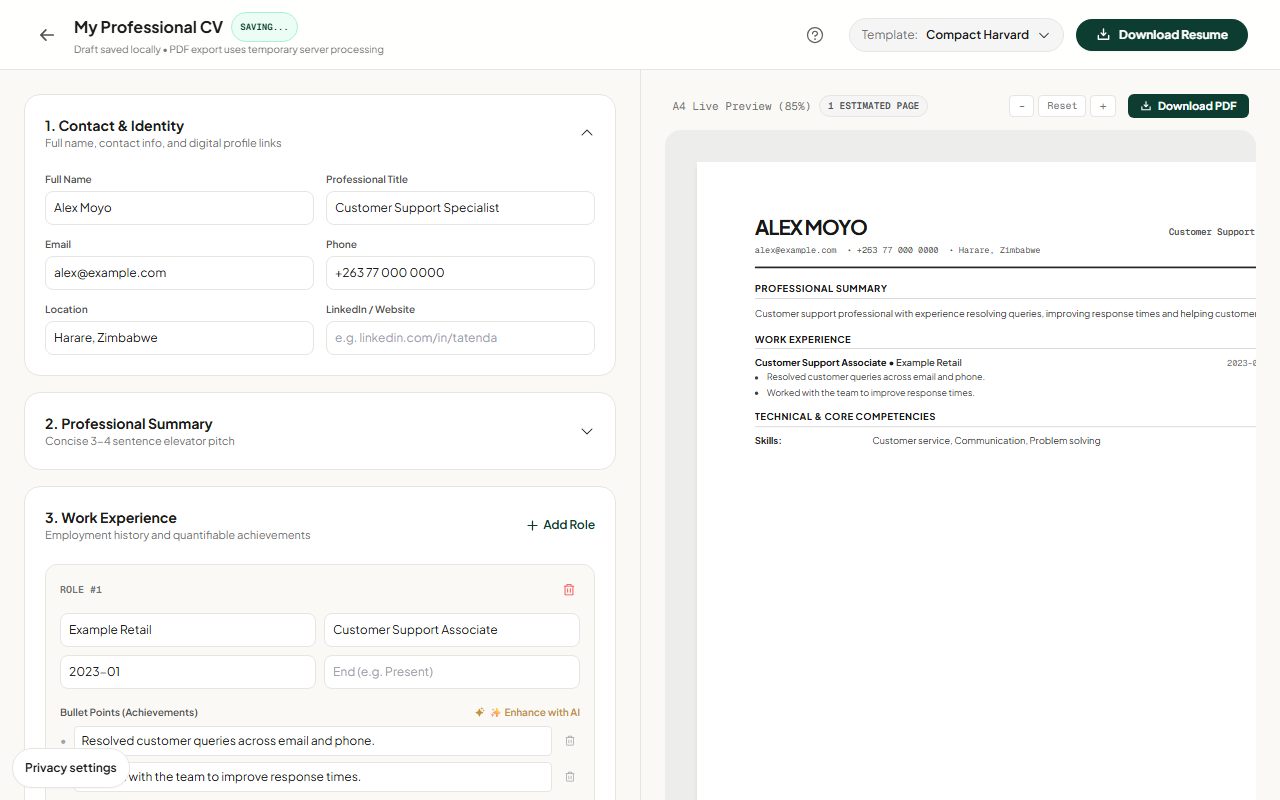
Open CV Studio and work through the editable sections. Check Contact & Identity, Professional Summary, Work Experience and Education, then any other sections relevant to your application. If a draft contains sample content, replace it before exporting. Do not leave an example name, qualification or achievement in your final document.
Write bullet points that say what you did and what changed. Use a number only if you can support it. ‘Responded to customer queries by email and phone’ is better than an invented claim about increasing revenue or handling a volume you cannot verify.
Choose a template and check the full preview
Use the template selector to try the available free layouts. A template changes presentation; it does not validate your claims or guarantee that an employer’s screening system will accept the document. Choose a layout that makes your relevant experience easy to read.
On mobile, switch between Edit Form and the preview rather than trying to read both at once. Inspect page breaks, long URLs and text near the edges. Check that recent experience and essential qualifications are visible, and shorten wording that distracts from them.
- Choose a template from the selector.
- Review the A4 preview and estimated page count.
- Check spelling, contact details, dates and section order.
- Remove sample text and unsupported claims before generating.
Generate the PDF and open the downloaded file
Select Download Resume or Download PDF. The export may need time to queue, generate and download. Wait for the status message rather than repeatedly clicking. Public generation is limited to three per day; errors or limit messages should be read before retrying.
After the browser downloads the PDF, open the actual file. Confirm it contains the current changes and the expected pages. Give it a clear name such as Alex-Moyo-Customer-Support-CV.pdf, and keep a copy for the application you send. If the employer asks for DOCX, use its requested format; a PDF builder does not remove that requirement.
- The file opens and every page is readable.
- Your phone number and email are correct.
- No example content or blank sections remain.
- The filename identifies you and the application clearly.
- Attachments meet the employer’s file-type and size instructions.
Keep a copy and understand what leaves the browser
Your guest draft is saved in the browser. It is not a permanent backup and does not automatically follow you to another device. On shared computers, consider who else can access that browser profile and its downloaded files.
PDF generation sends CV content to Mabasa’s server for processing. Optional paid AI tools also process information you submit. The free manual builder does not require using AI. Download final PDFs and use the local backup option when you need to preserve drafts; review the privacy policy before submitting sensitive information.
Sources & product details
- National Careers Service: How to write a CV ↗
General CV structure, readability and tailoring advice from the UK careers service; employer instructions take precedence.
- Mabasa privacy policy ↗
Browser storage and server processing for PDF and AI features.
Product instructions reflect the implementation reviewed on 22 October 2026. Example screenshots may differ from your device or a later release. This guide is prepared by Mabasa; external sources do not endorse the product.